Most task managers make it easy to add more: more tasks, more categories, more reminders, more lists.
But the problem I kept coming back to was different: what happens when the list becomes so long that you no longer know what to do first?
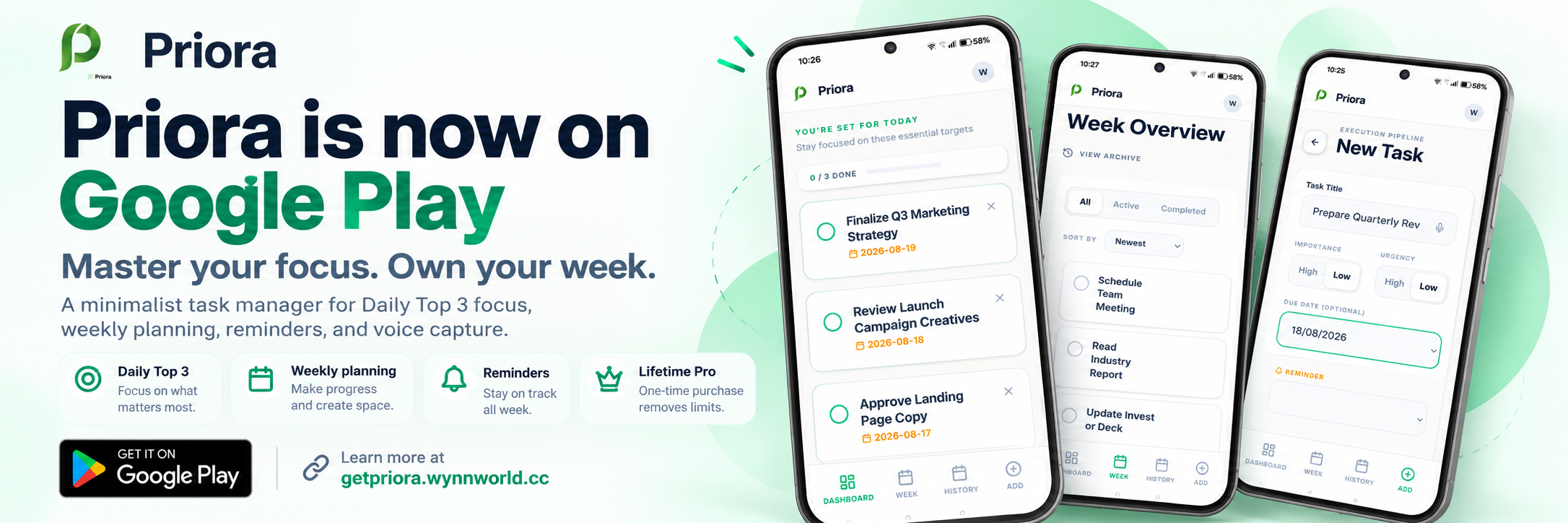
That question became one of the ideas behind Priora. Priora is a simple productivity app built around a Daily Top 3 approach — keeping up to three active priorities in focus at a time.
The problem with an endless to-do list
A long task list can be useful as a place to capture everything you need to do. But when ten, twenty or fifty tasks all appear together, they can start to feel equally important.
Instead of helping you act, the list can make you spend more time deciding where to begin. Priora separates the idea of having many tasks from the idea of actively focusing on them.
You can plan ahead, keep tasks for later and organize your week — while still choosing only a small number of priorities to focus on now.
Why three active priorities?
Priora's Daily Top 3 allows up to three active focus tasks at a time. This is not a limit of three completed tasks per day.
If you complete one of your active priorities, that slot becomes available and you can choose another task to focus on.
This keeps the active focus list short without forcing the rest of your work to disappear.
Planning the rest of your week
Not every task needs to become today's priority. Priora also includes weekly planning so you can organize upcoming tasks without placing everything into your immediate focus list.
This helps separate two questions: What do I need to remember? and What should I focus on right now? Those are not always the same thing.
Complete one. Free a slot.
One of the most important parts of Priora's workflow is what happens after a task is completed. A completed focus task no longer occupies one of the Daily Top 3 slots.
Instead of constantly adding more items to your active list, Priora encourages you to finish something before bringing another priority into focus.
Reminders without turning everything into urgency
Some tasks need a reminder. Others simply need to stay visible in your plan. Priora lets you add reminders where they are useful without requiring every task to become an alert.
The goal is to support your priorities, not create more notification noise.
What I have learned from early users
During Priora's early testing, one important lesson was that the Daily Top 3 idea needed to remain flexible. Originally, completed focus tasks could still occupy a Top 3 position. That created unnecessary friction, so the behavior was changed: completing a focus task now frees the slot.
More recently, one real user described the Daily Top 3 approach as clear and helpful because it allowed them to focus on the most important tasks without feeling overwhelmed.
That same user suggested quick first-time tips and asked whether Priora reminders could eventually work with Google Calendar. Those ideas are being evaluated carefully rather than automatically becoming features.
Priora is still evolving
Priora is still a young product. Right now, the focus is not on adding as many features as possible. It is on understanding whether the core workflow is genuinely useful.
The early feedback is encouraging, but there is still much more to learn from real users.
Try Priora
If long to-do lists sometimes leave you unsure where to begin, Priora's Daily Top 3 approach may be worth trying.